

So You Just Want a Backup Battery. Here’s A Cheat Sheet for November.
Let’s talk about watts.

As we discussed last time, emergency backup batteries have gotten a lot more affordable despite tariffs, wars, inflation, and bad luck. You can save a lot of money with upcoming holiday sales.
But..
There’s so many brands and models out there. I’ll admit, it’s confusing. And a lot of newcomers to the survival lane don’t really understand what it all means when they hear phrases like UPS bypass modes and “lifting power.” It’s way easier than wiring up your own off-grid system. Still…
We’re going to fix that.
Look at the unit’s capacity
Here’s what you need to know:
First: Most companies sell two different types of backup units. They sell “power stations” or “generators.” And they sell “batteries.” You’re going to need a generator/station first, because that’s what you can actually plug your appliances and devices into. You can’t plug your stuff into a battery. Most of the batteries are just expansions that you connect to the main station. I know, that’s weird.
You’ll get used to it.
Look at the watt-hours (Wh) listed on the backup unit. It’s usually displayed right under the model’s name. Let’s look at the Apex 300.
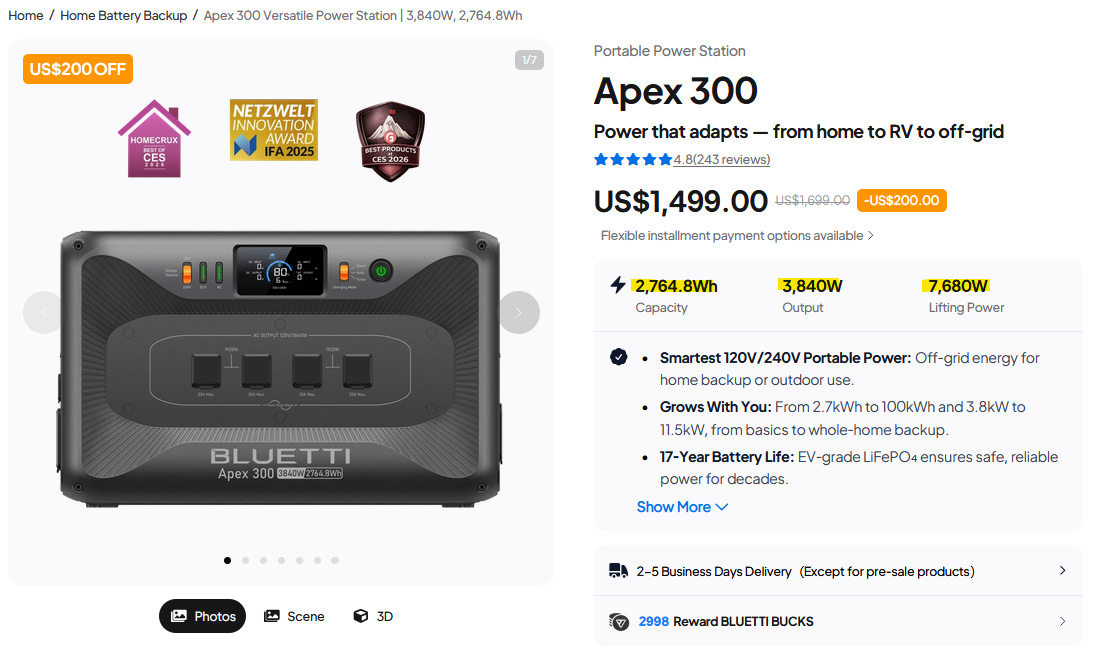
It says 2,764.8Wh.
Next:
Calculate your loads
A battery’s capacity doesn’t mean much until you calculate your electricity needs. We’ll start with the operating watts.
Look at the labels on your devices. A phone draws 5-30W. A laptop draws 30-100W. A mini fridge draws 50-100. A chest freezer draws 50-200W. A window AC unit draws 400-900W. A portable heater/cooler draws 900-1,500W.
The heavier appliances list a startup surge, but it’s often scrambled in electrician’s code. The quick interpretation: It’s usually 2-3 times the operating wattage when you first turn it on, only for a few seconds.
We’ll talk about that in a minute.
For now:
Take out a pen and paper. Grab a calculator. Check the specs on your gear or look them up online. Write down your loads. Add them up. That’s your wattage goal for each hour you go without power.
Multiply that by how many hours you think you’ll need to last. Don’t forget to write down the startup surge on bigger appliances.
Next:
Look at the “output” and “lifting power”
Companies that sell backup kits have replaced the ordinary term “surge power” with a new gimmick called “lifting power.” Other companies use phrases like “X-Boost,” “Smart Boost,” and “SurgePad.”
Sometimes, it’s the same thing as surge power.
Sometimes, it’s not.
Let’s unravel this:
To understand these terms, let’s start with the basics. Output refers to how much power your loads can draw before the backup shuts off for safety reasons. For example, the Apex 300 has an output of 3,840W. That means all of your combined appliances and devices can draw 3,840W continuously with no problems, including their startup surge (defined below). In short, this describes how much stuff you can plug into your backup before it shuts off.
Heavier appliances like window AC units and fridges draw 2-3 times their operating wattage on startup. So a unit that needs 500W when it’s cooling will probably draw 1,500W for a few seconds when you first turn it on. A newer backup can handle that surge, even while powering a few other devices.
Lifting power should describe the maximum wattage a backup can handle when you first turn on your heavier appliances. It’s different from the output rating. The lifting power should be roughly double the normal output. That’s what allows you to plug in heavier appliances with high maximum wattages.
The cool thing:
Newer backups have such a high output now that they can accommodate some pretty heavy equipment, even without looking at the “lifting” or surge power. The lifting power just gives you an additional buffer zone.
Surge power was a major stumbling point for older backups. It’s often what kept you from running a portable AC unit, etc.
Not anymore.
A warning about “lifting power”
Sometimes, a company will manipulate its true surge power by calling it something else and then inflating it. The new “lifting power” isn’t always a true surge power. It’s simply the backup manipulating the load into starting up with lower wattage. That’s very dangerous for medical equipment and other devices.
It could ruin your gear.
How to be sure:
True lifting power only applies to heavier backups in the 2-4kWh range and beyond. With smaller backups and portable power stations, it’s misleading. True surge power is almost always just double the normal output rating. So if the “lifting power” is more than double the normal output…
Don’t trust it.
Minimize your needs
Now you know what loads you want to run.
You know how to evaluate a backup.
Before you hop online:
Try to minimize what you need. The less electricity you use, the longer your backup lasts. So, look at your loads. Cross off things you don’t need for basic survival and creature comforts. For example, I have a desktop design station with a heavy-duty graphics card. I’m not gonna be using that during a power outage. I’ll be using my laptop or a tablet. Now you have a rough idea of what size battery you need and how many to power your critical loads.
Here’s where you need to make a decision:
- Powering a few smaller things for a long time.
- Powering a few big things for a short time.
- Powering a few big things for a long time.
- Powering big and small things for a long time.
You get the idea.
The more big things like window units and desktop computers you want to power for a longer time, the bigger the battery you’ll want.
It can get expensive.
But…
“Can you please just tell me?”
Maybe your head is already spinning…
Okay, let’s simplify this a little more. Backup batteries and power stations come in a few general capacities. You have the 1-2 kWh range. You have the 2-4kWh range. Then you have the 5-9kWh range. Here’s what each capacity does.
1-2 kWh capacity backups: These will charge a phone or a laptop. They’re lightweight. These backups won’t support something like a window unit.
2-4 kWh capacity backups: These will charge a few laptops and phones easily. They can run small appliances and even some medium ones like chest freezers and mini fridges. They can even run larger things like AC window units and portable heaters, albeit those drain the batteries pretty fast (2-3 hours or less). Most people who want a moderate, reasonable buffer get these. When you pair them with solar panels, they give you some true resilience.
Note: When you get a generator/station in this range, you can usually add expansion batteries to them. You can bundle them or add them later.
That’s a nice option.
5-9 kWh capacity backups: These can run appliances easily, including heavier loads like full refrigerators and even window units for several hours. They cost a lot. That’s why most people go down one tier. They get the generator/station at the 2-4 kWh range and then add expansion batteries.
It’s usually the best play.
Modular.
Look at the input specs
If you plan on adding solar panels, input capacity matters. Some smaller backups only accept 1kW of input from a wall or a solar panel. Others accept more, like up to 19.2kW in the case of the Apex 300.
A larger input means you can feed a lot more solar power into your backup and make sure it stays charged while running your devices.
In reality, most people are probably going to get 2-3 solar panels at 400-500W. That means you can feed your backups 1-2kW while the sun’s out. In short, it means your bigger appliances keep running.
Here’s where your wattage matters most. If you’re drawing 1-2 kW while feeding your backups 1-2 kW from solar, then your batteries don’t drain during the daylight. During a heatwave, you shut down heavier loads like the window unit or portable cooler once the sun goes down. You track the temperature. Once it’s dark and the outside temperatures drop, open your windows and run fans to stay cool rather than depleting your backups overnight.
During an ice storm, the logic flips. You use the sun, your winter gear, your sleeping bags and tents to stay warm inside. You harness the sun itself through windows. You can run a heater during the day. It might even help to boost your indoor space to a nice and toasty level, 65-68F (18-20C). Make sure you’ve got the backups ready to power heaters overnight when the temperature drops.
This maximizes thermal retention.
And battery life.
Are you adding solar panels?
You don’t absolutely have to add solar panels, but they give you that massive advantage during a power outage by allowing you to continuously charge your backups while they’re running your devices.
Most companies bundle solar panels with backup systems. Take the deal. That ensures all of your gear stays compatible. It’s possible to round up panels and batteries separately, but that creates a minor headache.
Another tip:
If you’re buying solar panels from Bluetti, get them bundled. Bluetti is notorious for shipping solar panels “randomly.” Even if you match the wattage, they might send you a different model that’s not compatible with the ones you already own. I did this once and had to return the panel. I complained a little.
I don’t know why they do it like that.
Anyway…
Are you going to expand?
Here’s a cool thing about backups:
They’re expandable.
Well, most of them are. You can add expansion batteries to your system over time. The expansion batteries cost less than buying an entirely new charging station. So if you get a 2-4 kWh system and decide you need more, then you can just get an expansion battery that plugs into it. Most companies make all of their power stations and batteries compatible, but not always.
You need to check first.
Funny story, ha ha…
Last year I bought the Bluetti Elite 200, assuming you could add batteries down the line. Well, you can’t. It’s a fixed single unit. The same goes for newer models like the Elite 400. They’re not expandable. They’re designed for portability. It’s not the end of the world, but a bit of a buzzkill. So, always check to make sure it’s expandable. If it is, that’ll be clearly stated in the description.
Don’t just assume.
What brands again?
I only talk about Bluetti because that’s what I buy.
I don’t have any deals with them.
There’s plenty of other brands. Check out Eco-Worthy. Check out Wattcycle. Check out Pecron. Check out EcoFlow. Check out Jackery. Check out Goal Zero. Check out Renogy. Check out Anker. Check out DJI. Check out Dabbsson.
EcoFlow usually offers the latest tech.
Anker offers the most reliability
Bluetti offers the best deals.
Jackery offers the lightest.
Go ahead and bookmark those sites. Do your research. Fill out your cheat sheet. Choose which model(s) fit your needs the best. Decide if you want to get any of it now, or if you want to wait for November, when these companies will likely start advertising their holiday sales.
What cheat sheet?
Here’s something I whipped up with InDesign.
It’s interactive:
If you’re interested:
I’ve started working on the second edition of my guide. You’ve got a few hours left if you want to back a full print edition. It’s going to have more information, more projects, more illustrations. It’s going to include different strategies and tips on leveraging these all-in-one battery systems. It’s going to be ready by May. I’ll be sure to post updates and info along the way.
Survival is hard enough.
I’ll help you cheat.
